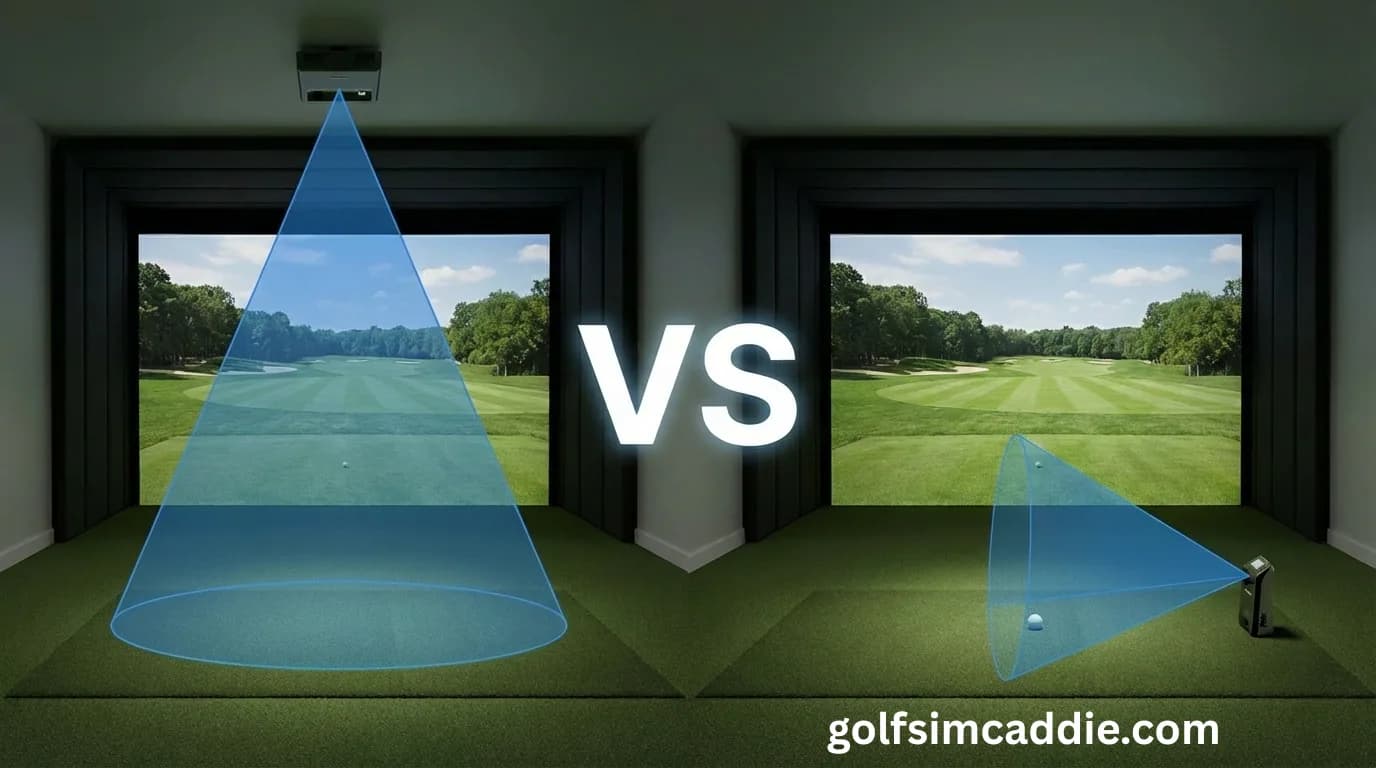
When you're shopping for a launch monitor for your home golf simulator, the specs on the box tell only part of the story. Equally important is how the device physically integrates into your space and that depends largely on whether it mounts overhead or sits beside you.
Both approaches work. Both can deliver accurate data. But they require different room layouts, mounting solutions, and setup considerations. Understanding those differences upfront helps you avoid buying a launch monitor that doesn't fit your space.
How Overhead Launch Monitors Work
Overhead launch monitors mount to the ceiling, typically 9-10 feet above the hitting area. They look down at the ball and club, tracking the swing from above.
This mounting style offers several advantages:
Clear Sightlines
With the unit above you, there's nothing on the floor to trip over or adjust between shots. The hitting area stays clean, and you don't need to position yourself relative to a ground-level device.
Consistent Ball Tracking
Overhead units see the ball flight from the moment of impact through the early trajectory. They're less affected by ball spin axis variations and can often track shots that side-mounted units might lose if the ball curves sharply.
Natural Swing Feel
Some golfers prefer overhead systems because there's no visual distraction at ground level. You set up to the ball naturally without a device in your peripheral vision.
The Tradeoffs of Overhead Mounting
Overhead units aren't without challenges:
Installation Complexity
Ceiling mounting requires more planning. You need structural support in the ceiling, proper cable routing, and often electrical work if there isn't a nearby outlet. In finished basements with drywall ceilings, finding the right mounting location can take effort.
Height Requirements
Most overhead systems need at least 9 feet of ceiling clearance to function properly. If your ceiling is lower, the unit may not have enough vertical distance to capture ball flight data accurately.
Calibration Sensitivity
Overhead units are sensitive to their position relative to the hitting area. If the device shifts slightly from house settling, temperature changes, or vibration, you may need to recalibrate. Rigid mounting brackets help, but it's still something to monitor.
How Side-Mounted Launch Monitors Work
Side-mounted launch monitors sit on the ground or on a low stand, positioned a few feet to the side of the golfer. They use radar or camera systems to track the ball and club from a lateral angle.
Simpler Setup
Side-mounted units require minimal installation. You set them on the floor, plug them in, and you're ready to go. No ceiling work, no brackets, no cable routing. For spaces where permanent installation isn't practical like garages that double as parking, for instance, this flexibility is valuable.
Portability
Many side-mounted units can move between indoor and outdoor use. You can take them to the driving range, use them in your backyard during good weather, and bring them inside for simulator sessions. Overhead units are permanently installed by design.
Lower Ceiling Tolerance
Since side-mounted units track from ground level, they're less affected by low ceilings. If your space has 8 or 8.5 feet of clearance, a side-mounted unit may be your only practical option.
The Tradeoffs of Side Mounting
Side-mounted units come with their own considerations:
Floor Space Requirements
The unit needs space beside or behind the hitting area. In tight rooms, this can compete with other equipment. You also need to ensure the device has a clear sightline to the ball, obstacles like enclosure frames or mat edges can interfere.
Positioning Consistency
Side-mounted units need to stay in the same position relative to the ball for consistent readings. If the unit gets bumped or the hitting mat shifts, your data may be off until you reposition. Some units offer alignment guides to help, but it's still something to manage.
Tracking Limitations
Depending on the technology, some side-mounted units struggle with specific shot types. Shots that curve sharply away from the device, very low trajectories, or mishits may not track reliably. The angle of observation matters.
Matching the Mount Style to Your Space
Your room's characteristics should guide your decision:
Choose Overhead If:
- Your ceiling is 9 feet or higher
- You want a clean hitting area with no floor-level equipment
- Permanent installation is acceptable
- You're building a dedicated simulator room that won't change
Choose Side-Mounted If:
- Your ceiling is under 9 feet
- You need portability between indoor and outdoor use
- You want quick setup without permanent installation
- Your space serves multiple purposes and equipment needs to move
For a deeper dive into launch monitor fundamentals, our launch monitor basics guide covers the core technologies and what they mean for your data.
What About Accuracy?
Both mounting styles can deliver highly accurate data. The differences in accuracy between overhead and side-mounted units have more to do with the specific technology inside the device than the mounting orientation.
High-quality radar units work well from the side. High-quality camera systems work well overhead. Entry-level units in either category may have limitations regardless of where they're mounted.
Don't choose a mounting style expecting it to be inherently more accurate. Choose based on your room constraints and usability preferences, then look for the best device within that category.
Planning Your Setup
Before buying, measure your space and consider:
- Ceiling height: Is overhead mounting even possible?
- Floor space: Where would a side-mounted unit sit without interfering with your swing?
- Portability needs: Do you want to use the unit outdoors or in multiple locations?
- Installation commitment: Are you willing to do ceiling work?
The Build Wizard can help you think through these questions and match your room to compatible launch monitor options.
The Bottom Line
Neither mounting style is universally better. Overhead units offer clean sightlines and consistent tracking but require more installation work and higher ceilings. Side-mounted units are more portable and easier to set up but need floor space and careful positioning.
The best choice is the one that fits your room and your usage pattern. Get that right, and the technology will do its job.