Start with how the garage must work when you are not playing. A screen that retracts is useful, but it does not automatically make the mat, launch monitor, projector or cables disappear.
This guide describes planning choices, not an installation we have carried out. The diagram is illustrative and does not establish safe distances for your equipment.
Choose the amount of setup you will tolerate
| Layout | What stays in place | What to check |
|---|---|---|
| Net + TV | TV and possibly a net | Net deployment, marked tee position, PC and cable storage |
| Fixed screen enclosure | Screen, enclosure and usually projector | Permanent parking loss, ball containment, ceiling obstructions |
| Retractable screen | Ceiling screen housing and projector | Deployed screen size, mounting structure, door operation, mat storage |
A net + TV plan is the first alternative to consider if the garage has to return to everyday use. A fixed projector plan makes more sense when the room can remain a simulator.
Mark two layouts on the floor
Draw the playing layout and the parked/storage layout separately. Mark the tee, stance surface, net or screen, PC, display, door tracks and shelves. Include the player and equipment paths between those positions.
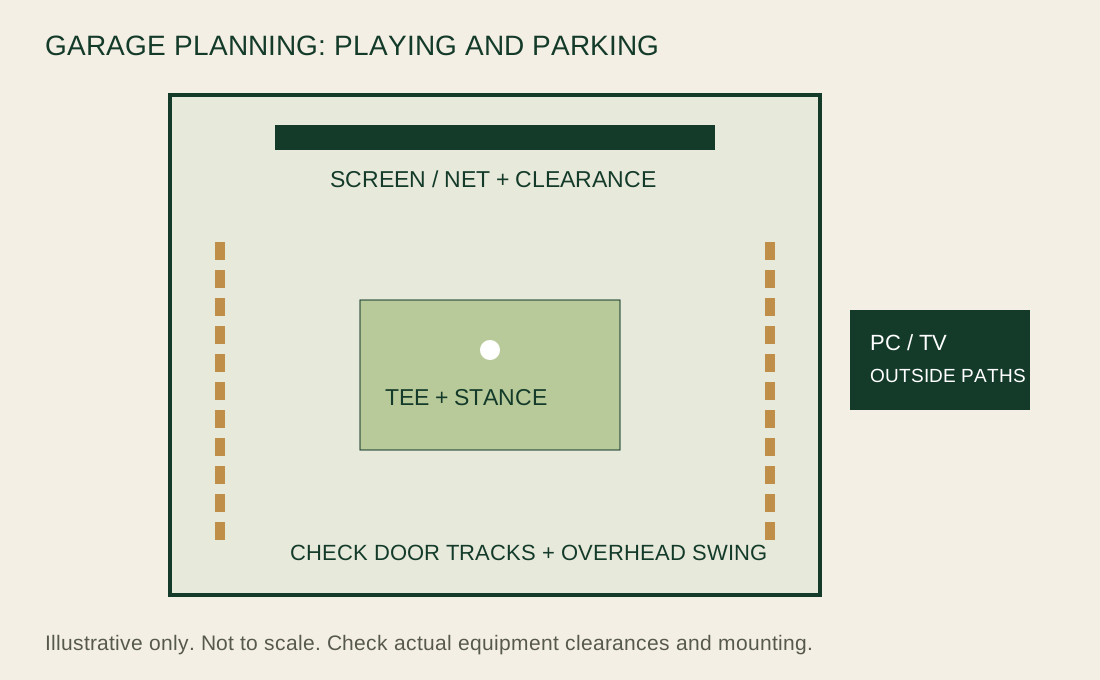
- Check the door both open and closed, without swinging or hitting balls near moving machinery.
- Include mat height and club length in the swing-clearance check.
- Plan cable routes that do not cross a walking, driving or swing area.
- Allow the net or screen's specified rear clearance; a wall directly behind it is not automatically safe.
- Ask an installer about structural mounting if you cannot verify the support.
Carl's measuring guide is a useful starting point. It does not replace the exact equipment manuals or a room-specific clearance check.
A retractable equipment example
Retractable projector GSPro build
Researched equipment example, not a complete purchase quote or a hands-on test. Room fit, exact variants, PC, display and installation still need checking.
- Square Golf Home Edition
- Published catalog range; verify the exact configuration. Catalog verified 2026-10-20. squaregolf.com ↗
- $699
- HomeCourse ProScreen 180 Retractable Golf Simulator Enclosure
- Published catalog range; verify the exact configuration. Catalog verified 2026-09-04. shop.homecoursegolf.com ↗
- $2,299
- Carl's Place HotShot Golf Mat System
- Published catalog range; verify the exact configuration. Catalog verified 2026-10-25. shop.carlofet.com ↗
- $535 to $1,200
- Optoma GT2400HDR
- Published catalog range; verify the exact configuration. Catalog verified 2026-09-07. www.optomausa.com ↗
- $1,299
- Windows PC for 1080p GSPro
- Cost unresolved; obtain a specification and quote
- Cost unresolved
- Mount, cables, protection and installation
- Cost unresolved; obtain a specification and quote
- Cost unresolved
- GSPro Golf Simulator Software
- Published catalog range; verify the exact configuration. Catalog verified 2026-09-07. gsprogolf.com ↗
- $250
$5,082 to $5,747 known catalog subtotal
This subtotal is incomplete. It does not establish that a finished setup fits the guide's budget.
Unresolved expenses and recurring fees
- Impact screen: cost or configuration unresolved
- Window impact protection: cost or configuration unresolved
- PC and software requirements: cost or configuration unresolved
- Windows PC for 1080p GSPro: cost or configuration unresolved
- Mount, cables, protection and installation: cost or configuration unresolved
- Square Golf Home Edition: verify applicable subscription and software fees: cost unresolved
- GSPro Golf Simulator Software: verify applicable subscription and software fees: cost unresolved
Tax and shipping excluded. Catalog starting prices do not confirm your configured kit, room coverage or installation. Recurring fees are separate; no complete first-year or three-year total is claimed.
The HomeCourse ProScreen 180 listing advertises $2,299 and includes the screen/enclosure and ceiling-mount kit. That is the component price, not the price of a finished garage simulator. Official listing.
Installation, protection and cables need quotes for your garage. Tax, shipping, electrical work, heating, cooling and structural alterations remain additional or unresolved costs.
Radar or beside-ball camera?
Behind-ball devices need their own tracking distance in addition to player and net clearance. For example, Garmin's R10 manual calls for the unit 6–8 ft behind the ball and the net at least 8 ft beyond it. A short garage is not suitable just because a product's box fits on the floor. Garmin placement manual.
A beside-ball camera layout avoids that rear tracking position, but still needs safe player, screen and device clearances. Check software compatibility before treating a monitor as interchangeable with another.